Algorithmic Adventures in Python
A practical guide to logical thinking, algorithms, and problem solving.
Two types of knowledge
Critical thinking is the ability to make informed decisions by analyzing data and information. Solving problems, especially mathematical ones, requires practice: you can watch thousands of classes, but without practical application, the knowledge remains fragile.
Memorization is the retention of information, past experiences, and lessons learned over time.
These two types of knowledge form a continuous cycle. Analyzing problems leads to deeper understanding; that understanding becomes accumulated knowledge, which in turn enriches our analytical abilities.
Beyond memorizing formulas or relying on AI-generated solutions, let’s connect our thinking effectively to improve our capabilities.
What is logic in programming?
Logical thinking in programming means solving problems systematically, step by step, with efficient algorithms and programming structures.
The main structures are found in almost every language:
- Variables and data types — store and manipulate values of different types.
- Sequential execution — execute statements from top to bottom.
- Conditional statements — make decisions with
if,elif, andelse. - Loops (iteration) — repeat a block of code with
fororwhile. - Functions — organize reusable pieces of logic.
- Lists and other collections — store and manipulate groups of values.
- Logical operators — combine conditions with
and,or, andnot.
Algorithm essentials
An algorithm is a well-defined set of steps for solving a problem.
Example 1: Finding the area of a triangle
Find the area of a triangle.
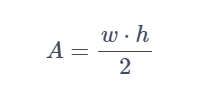
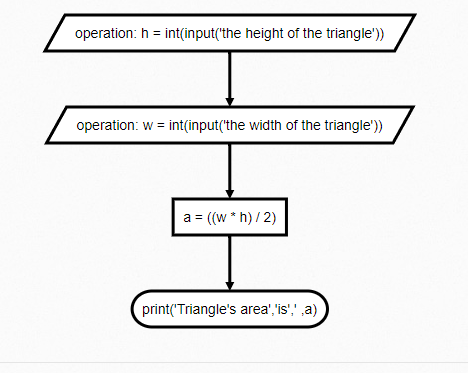
In this algorithm, height and width are integer variables supplied by the user. The variable area stores the result, and Python displays it with print().
1
2
3
4
5
width = int(input("Enter the base: "))
height = int(input("Enter the height: "))
area = (width * height) / 2

print(area)
Because input() always returns a string, we use int() to convert the input before performing arithmetic operations. Review Python data types before continuing.
Formalizing an algorithm
Modeling
- Define the problem to be solved.
- Extract the relevant information.
- Relate the problem to existing knowledge and other sources.
- Abstract the problem into a manageable model.
- Synthesize the algorithm.
- Select the appropriate programming structures.
The semantics of an algorithm
An algorithm should follow well-defined rules, avoid ambiguity, minimize unnecessary symbols or commands, and be close enough to a programming language that it can be implemented accurately.
Problem-solving skills
Example 2: Summing only even values from a list
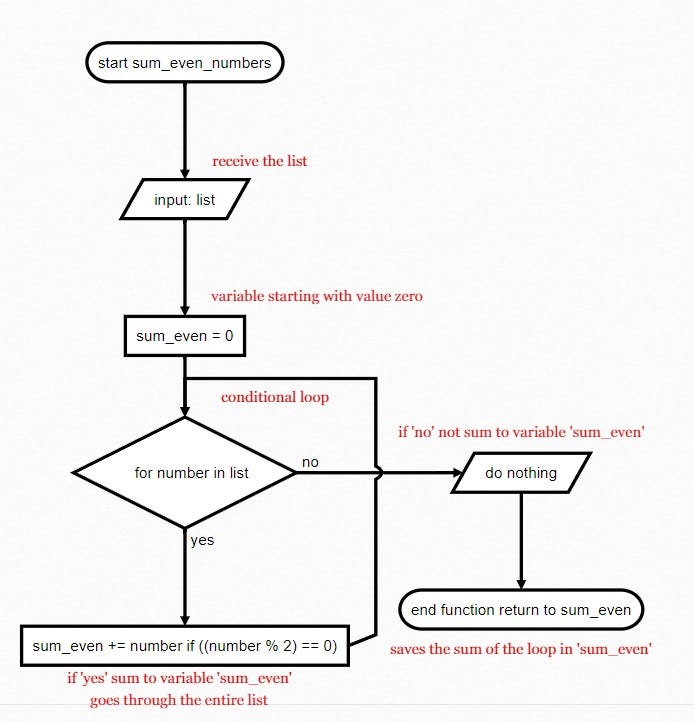
To sum only even values, we first need to understand what makes a number even. When an integer is divided by 2, an even number has a remainder of 0; an odd number has a different remainder.
Python’s remainder operator, %, expresses that rule directly:
1
2
10 % 3  # 1
10 % 2  # 0
The complete function is:
1
2
3
4
5
6
7
8
def sum_even_numbers(numbers):
    sum_even = 0

    for number in numbers:
        if number % 2 == 0:
            sum_even += number

    return sum_even
The for loop checks every number in the list. The if statement tests whether the remainder is 0; when it is, the number is added to sum_even. After the loop finishes, return gives us the accumulated total.
The advantage of functions
Once the function is defined, it can be reused with any list:
1
2
3
4
5
6
7
8
9
list_1 = [1, 2, 3, 4, 5, 6, 7, 8, 9, 10]
list_2 = [1, 6, 3, 7, 5, 9, 7, 10, 9, 10]
list_3 = [1, 9, 3, 4, 4, 6, 7, 11, 9, 10]
list_4 = [1, 2, 6, 5, 6, 6, 7, 13, 9, 10]

print(sum_even_numbers(list_1))
print(sum_even_numbers(list_2))
print(sum_even_numbers(list_3))
print(sum_even_numbers(list_4))
Example 3: A BMI calculator
Before coding, we need to define the inputs, the formula, and the classification rules.
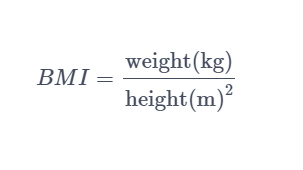
The BMI classification reference gives us the ranges. The while loop below keeps asking for input until it receives a number.
1
2
3
4
5
6
7
8
9
10
11
12
def input_data(message):
    while True:
        try:
            return float(input(message))
        except ValueError:
            print("Please enter numeric values only.")


height = input_data("Enter height in meters: ")
weight = input_data("Enter weight in kilograms: ")

bmi_result = weight / (height ** 2)
while True only ends when return is reached. If the input cannot be converted to a float, ValueError is caught and the user is prompted again.
1
2
3
4
5
6
7
8
9
10
11
12
13
14
15
16
17
bmi_conditions = {
    18.5: "Underweight",
    25.0: "Normal weight",
    30.0: "Overweight",
    35.0: "Obesity",
    40.0: "Severe obesity",
    float("inf"): "Morbid obesity",
}

for limit, condition in bmi_conditions.items():
    if bmi_result < limit:
        print(
            "Your BMI is {:.2f}, which is classified as: {}".format(
                bmi_result, condition
            )
        )
        break

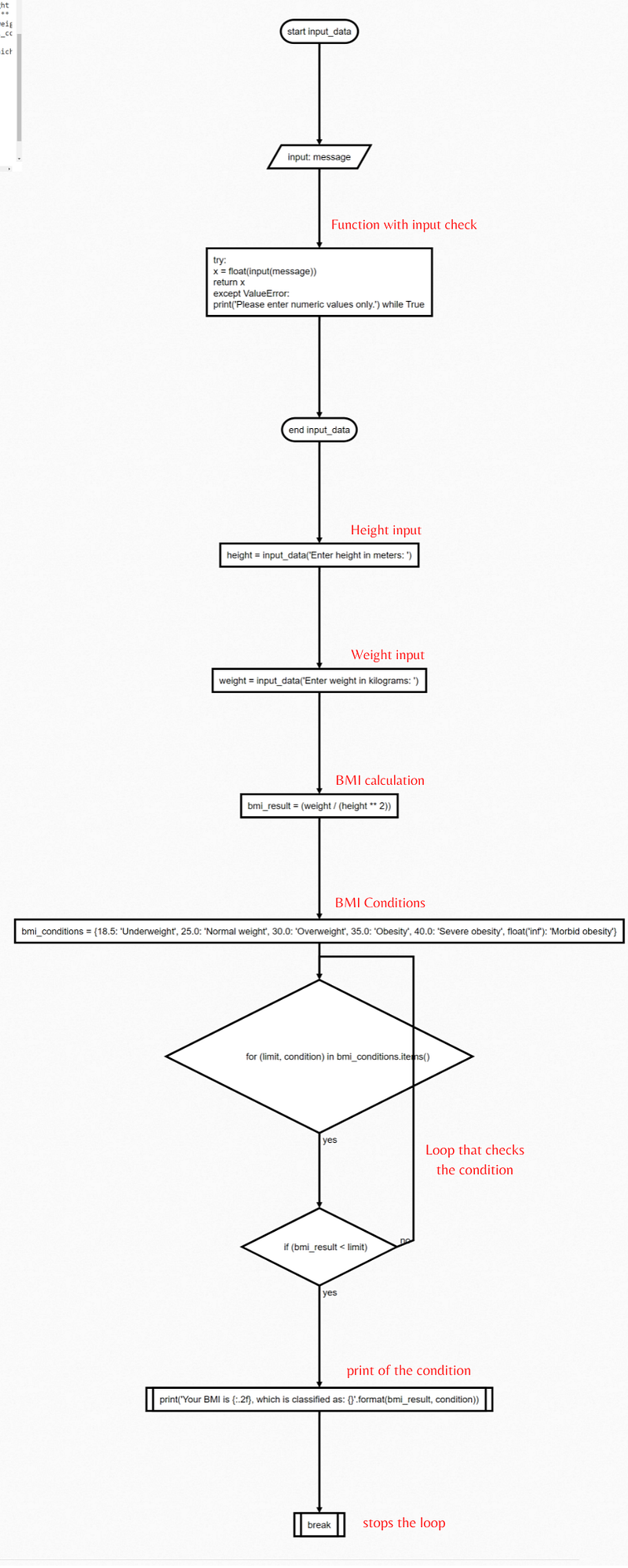
Here is the corresponding flowchart:
Getting more advanced
Once you feel more comfortable with algorithms, try solving these exercises in any language you are learning:
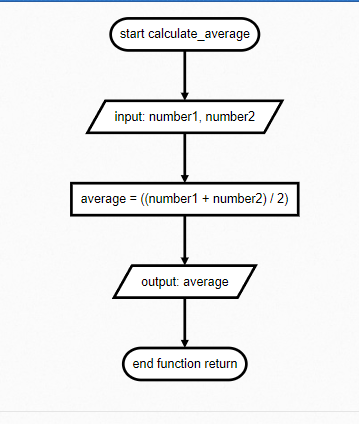
- Calculate the average of two numbers.
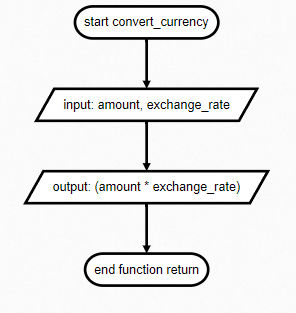
- Build a currency converter.
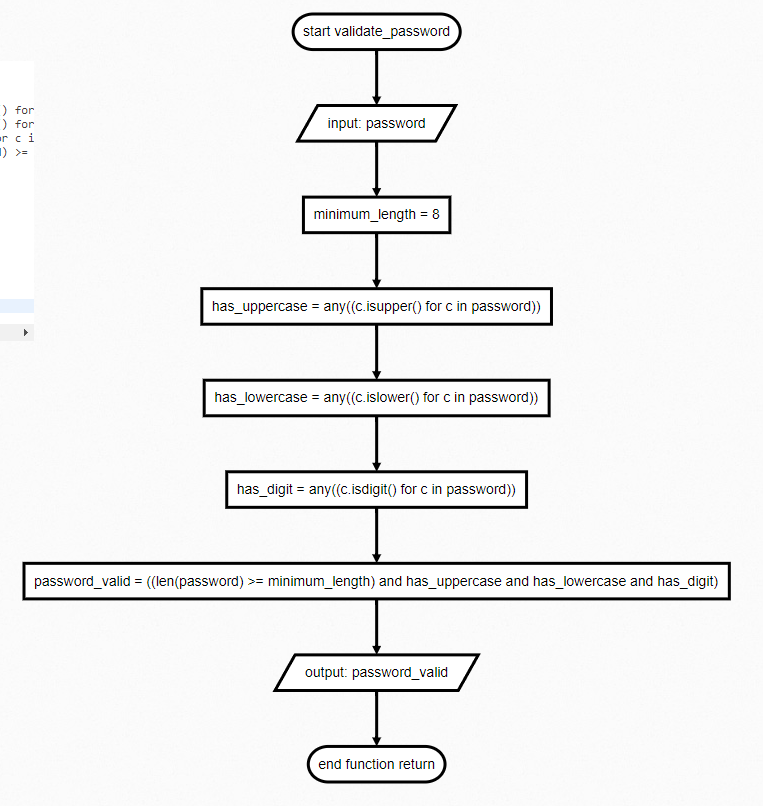
- Create a password validator in Python.
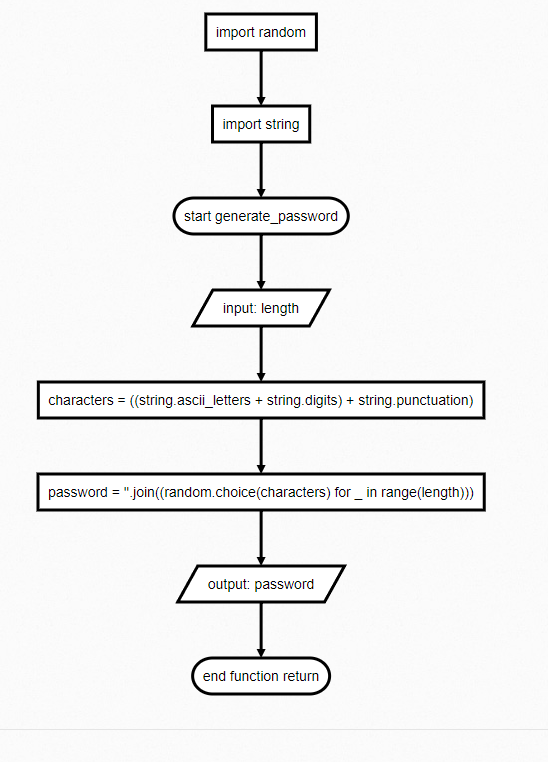
- Implement a simple password generator.
Final tips
You can convert Python algorithms into flowcharts with the pyflowchart library:
1
pip install pyflowchart
1
2
3
4
5
6
7
from pyflowchart import Flowchart

with open("your_file.py") as file:
    code = file.read()

flowchart = Flowchart.from_code(code)
print(flowchart.flowchart())
For example, the first algorithm can produce this flowchart definition:
1
2
3
4
5
6
7
8
op2=>operation: width = int(input('Enter the base: '))
op4=>operation: height = int(input('Enter the height: '))
op6=>operation: area = ((width * height) / 2)
sub8=>subroutine: print(area)

op2->op4
op4->op6
op6->sub8
You can paste this output into flowchart.js, whose source code is available in its GitHub repository.
Flowcharts are a helpful way to understand algorithms, especially when you are just getting started.
Thank you for reading.